Once again, here’s a new experience of my life 🙂
This article was written a few months ago, but I just decided that it was time to publish it 😛
Contacting MCB & SBM before writing this article…
Because of legal issues, I have first of all sent both banks a mail to ask them for an appointment to discuss about their web site and how it affects the user experience before I write this post.
SBM gladly responded to my mails, after which I was called for an appointment.
On the other hand, MCB replied to my mails, saying (I quote):
“It is to be noted that our specialists are working on the compatibility of Mozilla Firefox to our service.”
Internet Banking with MCB
So, some mins ago, I went onto the web site of MCB where I logged in successfully into the Internet banking Page.
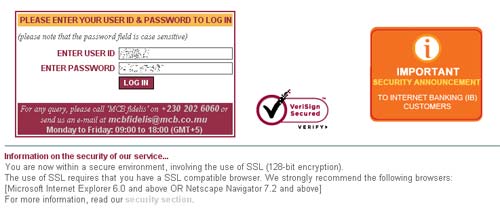
The very first impression is a good one, unlike the SBM web site, don’t worry, the SBM review is after this one, at the bottom!
After changing my password on the first log in attempt, I was redirected to the main page, where my account was displayed. Cool !
I clicked on my account number, and the latest transactions were displayed.
But I wanted more!!!
I clicked on the More Transactions button, BAW !
The system displayed the following message!
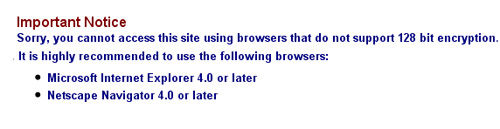
lol, I am using the latest browser man, Firefox 3.0.x!
and even Netscape has stopped developing their browsers and are now recommending Firefox!!!
Nevermind, doesn’t matter much, hence I decided to try another option.
BUT where is the HOME button???
I spent a few mins clicking here and there, trying to see how to get to the home page again!
Conclusion : There was no home button lol!
I had to hit Reload from my browser in order to get back to the main welcome screen.
Now, lets check some other options, I said to myself…
I clicked on a drop down menu at the top, and selected Payment to another MCB account…
Oops, the system crashed, again!!!
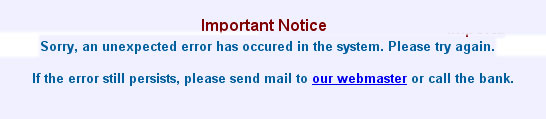
Please not that I edited the original screenshot so as to be able to bring that long error message into 2 lines for easy readability.
However, I tried the same options using IE 6.0, and everything works fine out there!
bof, lets move forward, and try another option from the drop down menu:
I guess that its no use for me to copy the same error message here, lol!
I ‘went back’ to the home page again, and decided to download my past transactions, that what the button title was!
I clicked and, and, and…..
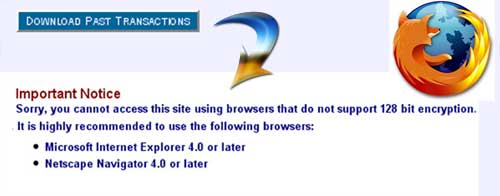
So, perhaps MCB’s Internet banking doesn’t really like Firefox, anyway, they recomment IE 4.0, so lets try with IE 6.0
And with IE 6.0, when you click Download Past Transactions, you are sent to a blank page !
The review of MCB Internet banking ends here, now lets change our bank 😛
Internet banking with SBM
Now, lets move on to SBM Online‘s service to which I have been subscribed since years now…
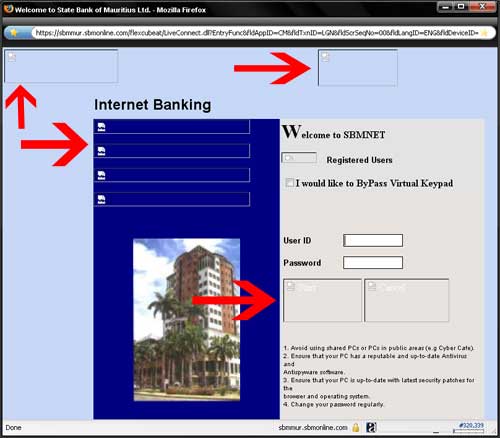
lol, they lost their chance to give a first impression because on their main login page, there are loads of pictures missing!!! You dont even know where to click to start with!
Next comes the login process, which is very painful for the end user!
I dont even know how it works koz SBM Online provides a virtual keyboard for more security, but its a very annoying feature to use, and disabling it can be really a problem.
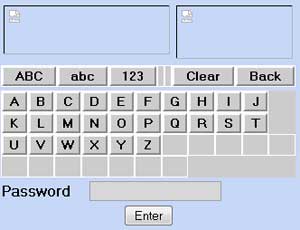
I have also noticed that the system at SBM is more secure, with
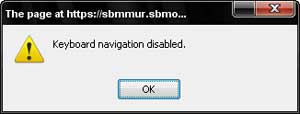
1. Keyboard navigation disabled (I ask myself wats the real use of disabling this???)
2. In case a user closes his browser accidentally or on purpose, he will be able to logged in only after 10mins.
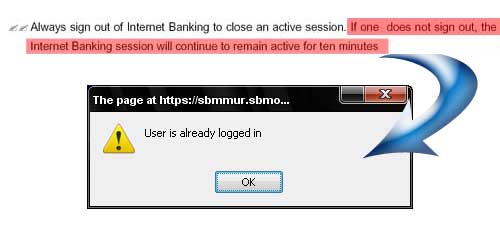
The navigation inside the Internet banking Window is much more pleasant, even if there is no Home Button. Every menu item is easily accessible and all of them work wonderfully on both IE and Firefox.
Conclusion
On overall, I prefer SBM Online compared to MCB Internet Banking, despite the few problems on their web site, which doesn’t prevent the end users to carry out their transactions, irrespective of their browsers.
Optimizing a web site to a specific browser becomes necessary when your end users form part of the general public. You can’t force these users to stick to a specific browser. It makes sense to make your users to stick to a specific one when you have a web application into your company and your end users are your own employees.
btw, I got both of my internet banking accounts locked since I forgot my passwords LOL.
Anyway, thats only my brief analysis of their internet banking services and how I (as a user) see their system.
Any of you want to share your user experience?
 Yashvinblogs
I have never used Internet Banking, but I’m a better “specialist” that those guys at MCB.
Use User Agent Switcher add-on with IE7 user-agent to be able to browse the MCB site on Firefox.
🙂
LikeLike
@Carrot : LOL!
Nice solution to satisfy all users!
LikeLike
I’ve been using MCB’s internet banking since almost a year now and i can say that my experience has been very pleasant so far. Swift payments, MCB-refills,payments to other accounts, query past transactions, viewing my loan a/c as well.
The only problem i have encountered so far is the automatic logout after 8 minutes, but i guess its a security feature as well.
Response time to online queries is also satisfactory.
LikeLike
i have the same problem with sbm internet banking says user already login …after this problem i contact them they says i need to write a letter to request a new password. in europe u need to call them they will ask few detail about you n u get access to it back in few mins.. here will take more than 1 month doing all that.
LikeLike
“It is to be noted that our specialists are working on the compatibility of Mozilla Firefox to our service.”
LOL at MCB specialists = amateurs
semester dernier nous fine ecrire ene virtual banking system program ki run on a blackberry (PDA phone, this one: http://na.blackberry.com/eng/devices/device-detail.jsp?navId=H0,C201,P563 )
li sync ek firefox, IE, sage accounting pro, quickbooks online storage en servant reseau wireless across canada. Li export tout to compte dans .xls ou OpenOffice etc
Meme to p kaka dans ene toilet public ek to envi avoye cash to famille, dans 25 secs to fini fer li haha mo pas croire so banne ‘specialists’ la pou capav fer sa
LikeLike
Yashvin personally i prefer using the MCB internet banking because if you mess around with the options, u will see there are loads more things you can discover 😉 like you can effect international transfers in a matter of seconds, apply for other services without the need for you to go to the bank, make local transfers and so on, and concerning the FF problem, FF 2.0 works fine on MCB internet banking 😉
well thats my opinion, i have been using that for some years now and very happy with it
LikeLike
I agree with Yashvin’s views except for the virtual keyboard. It is necessary IMO.
“btw, I got both of my internet banking accounts locked since I forgot my passwords LOL.”
Phone them – if you didn’t obtain new passwords, they can disable the password thingy temporarily. You’ll have to answer a slew of questions first but it helps esp. if there’s payment that you absolutely need to settle online.
SBMOnline is better.
LikeLike
wi wi moi jai 1 truc a dir!
some days ago ti bizin fer internet banking… bang firefox pa p log mi in!! mo gagne nerfs coz tou sa jour la mo pa ti gagne problem… call them and after 15 mins zot dir moi pa servi firefox mai internet explorer!! anyway mo pane lose my calm (like mo ti pu fer in any other similar situations) ek in dir zot ki zot ban espece de cretin, ki zot ban inbecile, soi disant internet banking ti bizin dir explorer banking.
mai seulement c bien pratik to use, got all my transactions done without problems.
LikeLike
I have the same poor experience on MCB using Firefox. I have to switch back to IE7 in order to have the correct display and be able to work properly. In general it is getting to be a pain on the web having compatibility problems with browsers. I have 3 browsers installed, IE7, Firefox3 + Opera. With the most frequently visited websites you get to know what browser works best. Not sure why most banks work around the IE7 cos it is not the fastest browser not forgetting all the recent security worries.
LikeLike
It would be interesting to point out here, who was the developer of the MCB internet banking.
If I am still correct, it’s DCDM Consulting!!!!!
LikeLike
@Anony :
Some part of what you said is true, but
1. The web site was made several years ago, when firefox etc were not widely in use (or was not even on the market), hence MCB should have updated their system.
2. From what I learnt, the team from DCDMC worked on a different part, not on the web site itself.
btw, no need to hide behind an anonymous proxy or name, no one will sue you.
I dont understand why some people fear to say things, especially if they are so sure about them!
Nice try lol!
LikeLike
[re=29369]RocketScientist (Kunal)[/re]:
Yeps Email Money Transfer, it’s really convenient and you can transfer funds to external account for a small fee…I agree!
LikeLike
Never tried internet banking. And I don’t think that I will try it soon.
LikeLike
At least, their e-commerce payment system, which I wrote in 2001, still works 🙂
I cannot vouch for the Internet Banking guys, though. Credit where due, MCB is among the first banks to have introduced internet banking.
Eddy.
LikeLike
I’ve been using MCB’s IB for almost two year now and so far i have no complaints. Actually the IB seems to be having problems with FF3 only. Else it work well with IE 7.0 and even Nokia N73’s browser. Actually it worked best with FF2 when i was using it and still if i am at work, and need to use IB, i log onto a SunRay thin client (http://www.sun.com/sunray/sunray270/index.xml) which runs on solaris and by default has FF2 and enjjoy the pleasure of IB.
I did hell a lot of transactions on the IB..phone recharge..money transfer..credit card management request for this and that..etc..etc, and this come really very handy when you are abroad and have to manage your money.
i barely use cash anymore, most of the time i use credit cards or IB.
I have not used the SBM online banking. But i have a friend who does, and when he compared his IB with my IB, he said that we at MCB have the best IB service in mauritius.
LikeLike
Vote for : NO INTERNET BANKING 😛
LikeLike
I was told that you could make credit card/paypal payments without an actual card with Internet Banking. Is that true?
LikeLike
barclays internet banking is world class!! 😛
LikeLike
I have been using MCB INTERNET BANKING FOR almost 2 years now. when i subcribed with SBM since 1 n 1/2 year they are still sending me my password?!??!?!?! i prefer MCB i do almost everthing with it..
LikeLike
Haha, Never Mind!!! Hmm, Well i fink mstly evry1 got problems here and there wid their “INTERNET BANKING” so far…
Keep trying…but SBM is better Off!
Dunno? Why BOM have provided these banks such license lolz…
LikeLike
Hiyas,
Nice review. Good that they let you publish it. At least, they contribute to honesty. Are these banks fully government bodies?
By the way, a little question, is there any bank providing paypal services in Mauritius, please?
Thanks
LikeLike
@Jen: You think read this article for more information about Paypal and Mauritius : http://www.yashvinblogs.com/ebay-mauritius/
LikeLike
hey – did you check NEW MCB IB for the past week (when access was possible)? the site apparently had far too many views and couldn’t handle the load!!! MCB posted a message when access was not successful – at mcb.mu/page404.htm
NO Comments!!!
LikeLike
I don’t like the new MCB IB, the old version was smoother. This new system is sluggish and not really user friendly to get around. Also I get quite a bit of time out where I have to log-in again. I have voiced a couple of points to the customer service.
LikeLike
Mauritius banking sucks
In uk with a simple debit card visa and master card purchase are already activated and you can buy without limit …
so fuck Mauritius bank credit cards …. really sucks because of the credit limit
get a uk bank account you will not have to suck those Mauritian bank like this …
LikeLike
It would be great if you can update this article when you have time. I was thinking about trying sbm internet banking in the near future and your reviews have always revealed most prestigious in my tech-thingy decisions. Thanks 😀
LikeLike