
It may sound fairly easy to add your watermark(logo or name) onto 1 or 2 pics but how will you achieve this if you have to share 100 or 200 pictures? You may have your own technique, but let me show you mine, just discovered this feature a week ago on Adobe Photoshop CS2.
Today, I will be using  the “Actions” of Photoshop CS2 to add a watermark and also resize the image before uploading it to Facebook for example.
Step 1
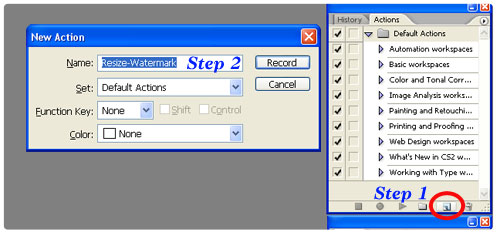
Open an image and click on the small icon to open the small window shown.
Step 2
Then type in the name of the action, here defined as “Resize-Watermark”.
Step 3

All actions performed on photoshop will now be recorded. Once done, these actions can be replayed on one or a set of pictures for executing the exact actions.
As you can see above, the “Record” button has been activated.
Step 4

Now, you can add a text layer onto your picture. Additionally, you can change its position or style it.
Step 5

Above, the picture is being resized to a width of 720pixels. All these actions will be recorded accordingly.
Step 6

After you are done with the modifications, you can now click on the stop icon. So, here ends the initial set up/recording of our action(s).
Applying the watermarks and resizing (Actions) to other images.
Now, your life is going to be so easy!
Let’s say for example, you have a folder full of pictures that need watermarking and resizing before the uploading process onto Facebook.
Step 7
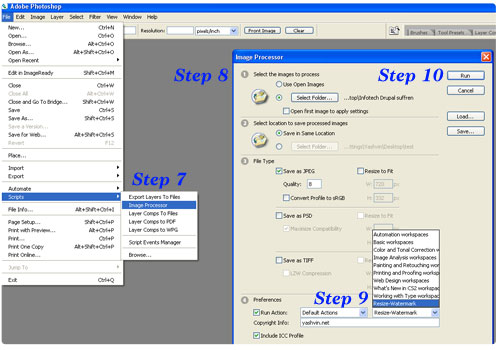
Go to “FILE > SCRIPTS > IMAGE PROCESSOR“
Step 8
If you wish to process files from 1 specific folder or images that are currently opened in the Photoshop workspace, this is where you should select the right image source.
Step 9
Choose the action you recorded earlier
Step 10
Click “Run”.
That’s all 😉
No more additional steps required.
You might now witness a matrix-like effect during which the pictures will be rapidly opened and processed. These pictures will be saved at the location specified in the previous window. After all the processing is done, you can have a look at them.
You want a preview of the results?
All the shots displayed on the Infotech blog post were watermarked and resized using the same technique. As you can see, all the watermarks are exactly positioned at the same location.
Whether you have 1 or 100 pics, it will now take a few seconds to get everything digitally signed 😉
This technique has been tested on Adobe Photoshop CS2. I haven’t tested on other versions but it might work. Anybody, please confirm.
I am sure that some of you might have other techniques as well, do you? Please share how you do it and also, don’t hesitate to share this blog post with others 🙂
Thank you for your visit 😉
 Yashvinblogs
Hmmm… I’ve always used that. 🙂
LikeLike
yaaaaaaaaaaaaaaaaaaaaaaaaaaaaaaaaaaaaaho
LikeLike
thats like using macros in excel, right?
LikeLike
@Luvnish: Exactlyyyy!
LikeLike
great!!! keep the tips coming 🙂
LikeLike
whats is that all about?? Whats is abode photo shop?! 0o
LikeLike
foutousop actions ❤
LikeLike
Kinda overkill imho.
I use my image-viewer, XnView to watermark my pics. It supports batch-watermarking too.
LikeLike
@Inf: Hey thanks for sharing that! 🙂
LikeLike
honestly Yashving, i have been into photography for 5 years or so now, i have never put a watermark as such in my pic, only in my early beginnings kot mo ti imper glaceur, i used to put a little fmelot but still was very small.
c ene avis anyway, but for me, its quite arrogant to put a watermark as such i dont see the point apart from protecting your pic, and still, if you want to protect it from copy paste and stealing, you have to put it in the middle where it would be difficult to remove on photoshop, but to put in on the side or in the corner is just so useless and it means showing off for me, also it has its advantages, it gives your photos and identity.
ms sans fausse pretention, i proudly say i dont need watermark to show people that this is MY pic. pictures should speak for them
and dont forget, watermark should be for protection of the pictures, nothing else.( for me)
LikeLike
@fred: Mais parfois vo mieux to met ene ti watermark akoz kouma to koner, ena dimounes pas manque toupet 😛
Mo croire bien to meme tone bisin remarke sa lol.
En passant, moi mo servi watermark boukoup, surtout lo bane articles akoz depi mo dans blogging, boukoup pirates ine passe r mo l’articles et fotos mo servi, parmis ene tas mauriciens!
Merci boukoup pu to participation azordi 😉
LikeLike
c pas le fait d’utiliser watermark, mais mone checker couma to servi li, ek li pa bon couma to place li, li mieux si to ti met li ds bane place cot ena bcp details cot li dificile pou remove, ms to met li ds ene coin, sa soi crop, soi to clone, li trop simple, perso, mo pa trouve to foto ek to bane larticle proteger de cette facon, revise to strategie lol.
ah oui, dimane pa manque touper pas na pas manquer sa lol
LikeLike