
Hi to all out there!
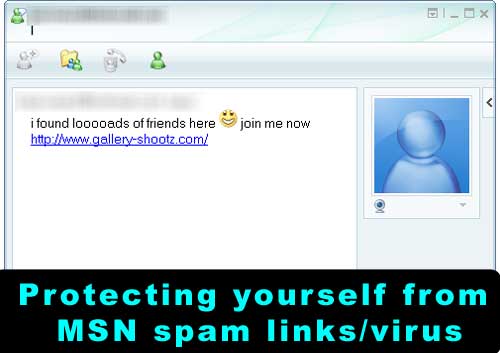
I am damn sure many of you are fed up of the spam messages that your own msn messenger contacts seems to send you, isnt it?
Well, in fact, most of the times, your contact is not even aware that “he/she” is sending you links to view his/her nude pics or to visit some other sites which sometimes seem to be exciting!
The virus/trojan usually steals your login information and signs in on your behalf to send those links to all of your contacts.
How to stop it?
1. Change your Password
That’s THE thing to do first if some of your contacts tell you that you are sending him/her virus links.
Here is the link to manage your account.

2. Scan your computer for viruses
Get the latest updated antivirus from the web and do a full scan on your system.
There are so many antivirus available for free, no need to download cracked ones.
3. Scan your computer for spywares
Get a spyware scanner! Again, google is a very good search engine…
How to prevent it?
STOP clicking on strange links sent by your friends.
Of course, links of type yashvinblogs.com is an exception 😛
Sometimes the messages sent are so real, for instance :
“Have a look at my pictures!”
However, be alert…. double check with your contact if the message is genuine.
Anyway, would not it be weird if a contact (with whom you have never chat) sends you his picture to view?
Do not install/use untrusted third party software/web sites
There are many web sites/free software available on the net which claim to “Show people who blocked you” or to “Show offline contacts”.
Most of these are fake! They usually ask you to enter your login and then, they steal your password!
I found 2 web sites (here and there) which claim to be able to solve your msn problems.
Do try them and let us know!
And if nothing works?
- Try to perform a system restore on your system to an earlier date.
- Still, if nothing nothing nothing works, the only thing to do is to format your computer and be careful next time!
If anyone else has other advice or solutions to remove these threads, feel free to share!
Cheers and have a nice weekend to all!
 Yashvinblogs
Stop using WLM. 🙂
If you’ve got a virus, a virus-scan always works & reinstalling WLM fixes it. 🙂
LikeLike
Was infected last year or the year before… don’t recall…
Used a small utility called MSN Fix at that time… The solution was on my old blog (R.I.P.)… Dunno if it still works…
LikeLike
Only idiots believe that the “see who blocked you” works! !And only idiots accept the SEE MY SEXY PICTURES LINK..Damn perverts they are! !LoL..I deleted every friend who has that virus/spam. And I emailed them telling them the reason. But it’s strange. Some of them are careless and don’ want to remove that virus! Bunch of &^^&%$%$..
Rant over.
LikeLike
Hello!
Such messages have come so popular. Would you imagine that everyday, at each hour, some 10 friends invite me for sex, making new friends, or I get a story about Jess, John, Monique, etc. relating how they got rich, how they became superstars in music and film industry though I don’t recall such names hitting the box office. And even some friends who don’t have webcams invite me to see them naked live or in pics!
Why should I care for these people who I don’t know? Why should I be interested in these online invitations? Well, if someone has got some sense, he/she won’t click on the nasty links.
A friend of mine who got the huge problems of her Live Messenger sending such invitations formatted her computer and re-installed everything. And yet I got invitations from her. Perhaps one another got it right: reset your password! And that too not using the infected computer.
I also confirm that doing a virus, trojan horse scan is also a good idea. Just like going to the doctor’s when you’re sick. It might detect something and clean it.
LikeLike
I am almost fed up of contacts sending me these links i sometimes want to delete them but they are important ones 😦
LikeLike
Still if nothing works, stop using WLM as cm6 says! Facebook chat with friendlists does the job too now. Or else, use Digsby 😀
LikeLike
Well.. as soon as someone sends me those mesagges.. i click “Block”..
@yashvin.. i dont think the solution would be to scan/restore/format the PC. The PROBLEM is with the people. and the solution is Education(long term solution). If people do not click on those links.. they simply die(the links).
@tushal, i do not like your tone. “calling people Idiots”. You speak true though 😛
Very good article. XD I hope “those who need it” read it.
Rock ON!!
LikeLike
i think there is a program called MSN Photo Virus Remover. It removes the photo virus. You can use it @ ur own risk and its free lol.
LikeLike
Well I get these links from friends (cannot block or del them!) everytime I log in, but fortunately I knw how harmful they are and just close the window…of course have an uptodate antivirus s/w which scans all files and so far no bad reports 😀
LikeLike
System restore is the most dangerous option that you can enable on your computer! Imagine you got infected by something and that gets added in one of your restore points??? Each time you will be restoring the malware again!
Its not as if this rarely happens…. this happens all the time!
Anywayz overall tip is cool
LikeLike
@selven : yeps, thats true!
Thanks for mentioning it 😉
LikeLike
LoL ! these spams links only take control of your msn account .. Just change your password .. you’ll stop get those spamming nonsense 😉
Or like me, Use Pidgin on Fedora or Ubuntu and you’ll be free from all crappy rubbush 🙂 Dnt forget that opensource is the future (: Since you love free stuffs like free antivirus.. Why dont you people use freewares? Hope I’ll get some nice response to my post .. Take care all 😉
LikeLike
@Kalel : Yes for opensource, but this does not prevent some people from using 3rd party web sites to see who blocked them 😛
Thanks for ur visit 😉
LikeLike
I created a website similar to this to help MSN users fight against MSN spam and viruses. Originally it was intended for my friends in Hungary, but it began spreading. So I translated it into English and made it available at http://msn.solymosi.eu/en
LikeLike