

Did you know that you can make Google SMS your reminders freely to your mobile?
I knew this since months ago, but I was surprised to learn that some of my colleagues did not know this feature, which works even in Mauritius!
How it works?
First of all, you should have a google account or simply a gmail login.
Next, navigate to Google Calendar, and set up a new reminder for some event…
There are several options available to notify you of the event which is coming up
- Email (google sends you a mail)
- Pop Up window (a pop up window appears at the bottom of your gmail inbox)
- SMS
Today, I gonna show you how to set up the SMS Alert for your mobile, so that you can set up your reminders to be txted to you, lets say some 10mins before…

Step 1 : Navigate to Calendar
From your Gmail window, click on Calendar in the top left corner, or simply go to www.google.com/calendar

For those who don’t have a google or gmail account, don’t hesitate to contact me by adding a comment or chatting with me by clicking on the Chat with Yashvin in the right sidebar of this blog.
Step 2 : Set up your mobile
Click on the “Settings” link at the top right corner of your Google Calendar.

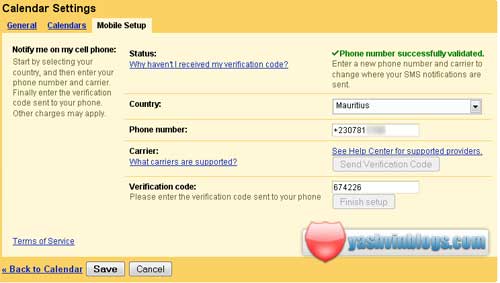
Then click on the “Mobile Setup” Tab
For the initial set up, you should follow the instructions on the screen.
At the end, you will end up with a screen like the one below.
Step 3 : Create an event
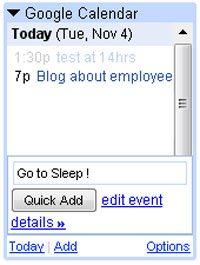
Now, to use this feature, navigate to your calendar screen and create a new event, for example “Go to Sleep!”

Step 4 : Set up the options
Click on the Options to be able to set up the reminder alerts.
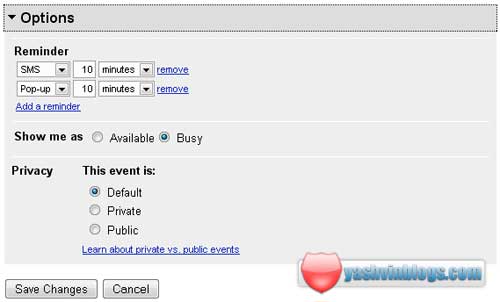
Finally, save the changes and wait for your sms before going to sleep 🙂
So, did you know this SMS feature of Google???
How do you find it?
 Yashvinblogs
hi five
excellent post !
LikeLike
wow! thats simply great! im a madgooglefan. bt i didnt knew abt this feature… coz i dnt use google calendar too much… but Free sms reminder! thats cool!
thinking of this… can it be use to send sms freely to anyone?? seeting up a “fake” event… and just sending it to some1 i want… *demoniac mauritian mind*
NEways.. gna heck this out immediately! thnx!
LikeLike
Mari top sa feature la… i used it for my exams… and will continue to use it for other appointments 😛 hihihi
It’s really handy… 😀
LikeLike
Knew that since last year… used it to send reminders of birthdays! 😛
But otherwise, I just sync my phone calendar with my GCal.
But a better trick is forwarding all your incoming mails to 230XXXXXXX@cellplusmms.mu… 😉
LikeLike
just tried it… works great! and ya.. replying to my own question… u can send sms to other ppl… simply coz they veryfy your email address is linked to ur mobile.. but but but… say u have a girlfriend… you make a gmail for her… 😛 registerter with her phone number….. pheeww… this could work.. for Hardcore sms users!
LikeLike
Vier zafer sa! 😛
Mais still, would be useful pou bane ignorants! 😛
LikeLike
too complicated for me, i prefer putting the reminder directly in my phone’s to-do list.. it’s faster and easier! Imagine the trouble u might get yourself into if on the day the reminder is to be sent to you there is a network problem like it’s often the case with emtel.. I think it’s unreliable! 🙂
LikeLike
Did not know that feature..Going to try it..:pThanks
LikeLike
li great wii mai moi ena chance mo pa tande mo mob fer beeeppp :p
prefere met alarme em lol… 😀
LikeLike
heh thts really nice..thx!
LikeLike
Nice illustrated post!
LikeLike
nice post yash…I didn’t know about this…quelle decouverte lol…
we must try it pourki pa bizin gaspille kass lor orange 😛
LikeLike
heyyyy zats so nyc..never knew of this feature…cool…gna try it…thnx Yashvin
LikeLike
wawa thanks for the tip Yashvin 🙂
lol interesting question is….how does this profit to google….koz si to guet bien…li ki p paye sa msg la….dja email la kdo m 😉 now sms too kdo :p….unless li ena 1 advertising package…ti pou interesting conner couma sa benefit li ^^
LikeLike
@n!135h: Nice question, but I think the following phrase will satisfy u:
After all, its Google!
lol
LikeLike
Just wondering how does Google do it for free???
LikeLike
sounds very interesting, have 2 try zis out… thanks 4 post ashvin
😉
LikeLike
@Anish : Its Yashvin, not ashvin pfff!
LikeLike
sorry , i just missed z ‘Y’… lol, plzz don’t mind…
LikeLike
Dude I really need to try this. Specially for birthdays, I always forget them.
LikeLike