
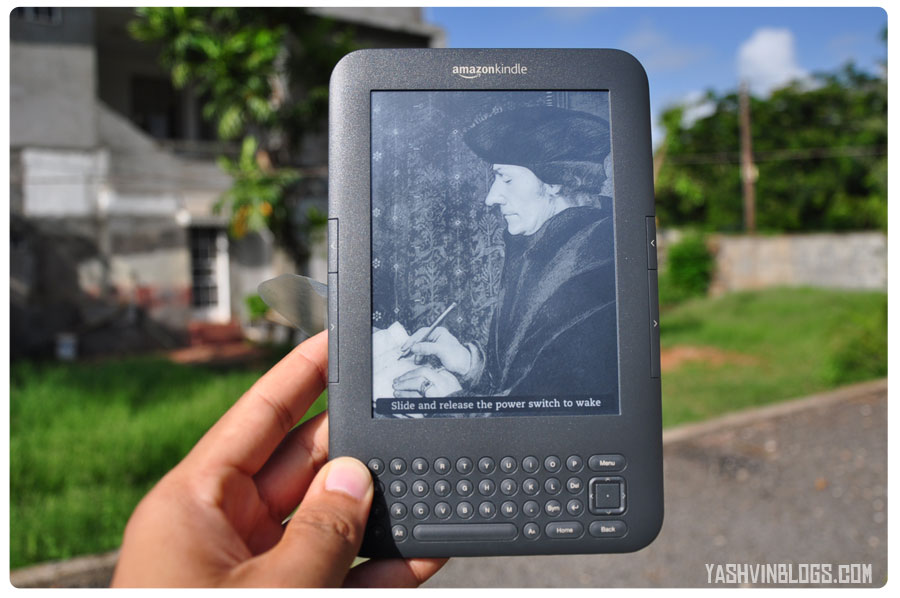
A few days back, I announced the arrival of my Kindle 3 and also blogged on Amazon shipping to Mauritius (for some items). Loads among you have been asking for a yashvinblogs.com review of this wonderful piece of technology. Before proceeding to the review : 2 of my friends already purchased theirs at nearly the same time as me and I can say in advance that after reading this review, you will most probably want to grab one immediately!
Don’t forget the video at the end!
A Kindle? An Ipad/Galaxy is much better!
Just like you need a speaker for playing sounds or a fridge to keep your items cold, the Kindle is among those things which you purchase only if you have a specific need in your mind. Can you think about doing anything else with a speaker or a fridge? Similarly, the Kindle is made for book addicts. Nothing more, except a few experimental features, we will come to that later…
You want to surf on the Net or play games, Apple’s Ipad or the Samsung’s Galaxy Tab might be made for you. So, don’t come and tell me the advantages of having one of those devices, I simply don’t need any of their extras.
Key features
Talking about the specs of this ebook reader, here are a few :
- 241grms, 190 mm x 123 mm x 8.5 mm
- 6″ E-Ink screen at a resolution of 600 x 800 pixels (simply impressive)
- 4GB internal storage capacity (abt 3GB available for book storage)
- Long battery life (up to 3-4 weeks, depending on usage)
- Text to Speech (Choose a male/female voice to read your book)
- WIFI
- Built in dictionary
- 3.5mm stereo earphone jack + stereo speakers at the back
- Microphone ( Amazon included one even though it does not offer any feature to use it right now. Perhaps they might be planning to release software upgrades (which are automatically installed) later on to add voice notes, who knows?)
These are only a few of them, there are loads more. As compared to previous Kindle generations, the Kindle 3 is lighter, thinner, better screen contrast, more storage, enhanced and new features and faster page turns, among others.
Yes, that’s a screen…
There’s no way you can compare the display of a Kindle to anything else. Displaying only in monochrome, the Kindle offers a pleasing experience with its unique and advanced E-ink technology. No eye strain, no glare even in bright sunlight (as shown in the first picture of this post).
You find the font too small or the lines too close together? Just press the “Aa” key and adjust your display.

You can even read your books in landscape mode as well!
E-what?
The E-Ink (electronic ink) is very similar to the ink used in the traditional books you know, to one difference. As the name suggests, the ink is spread electronically over the plastic display, giving a printed text like result. To sum up what I read on the net :
“Electronic ink is made up of millions of tiny microcapsules, about the diameter of a human hair. Each microcapsule contains positively charged white particles and negatively charged black particles suspended in a clear fluid. When a positive or negative electric field is applied, corresponding particles move to the top of the microcapsule where they become visible to the user. This makes the surface appear white or black at that spot.” [Link]
That’s explains a bit how the Kindle device can have such a long battery life (3-4 weeks) and the B&W display . While idle, absolutely no power consumption is required. However, when you change page, an electric field is needed.
Mobility
Not later than today, I had to travel to Port Louis by bus. I took a seat, paid the fare, took out my Kindle and continued reading my text book. No hassle about finding which book I was reading previously or even page I reached, the Kindle had everything saved in its mind. Just wake it up, that’s all you need to do.

Now, imagine yourself, sun bathing on the beach, reading one of your favorite classics or in a classroom (or lecture), pressing the previous or next buttons while all your class mates are busy going through a bundle of papers.
You will be The Geek, with everyone glaring at you with envy!
Never miss an important quote!

Did you just come across some interesting fact or need to add a small note for whatever reason? Use the physical QWERTY keyboard and the 5 way controller to move your cursor over the screen to select the text and highlight or add some note to it.
Access your highlighted or notes via the menu at anytime. Press “ALT + Enter” at anytime to share the selected text on Twitter or Facebook!

Increase your knowledge

Move your pointer over a word, the meaning is instanteneously displayed at the bottom of the screen. Look up for words definition in the dictionary or even on Wikipedia, right from your device.
Turning green
Being green is gaining much importance nowadays. Save thousands of trees by reading your books directly on an electronic device which you need to recharge only after a few weeks.
Buy online and get delivered in less than 60 seconds
I tried it, and it is amazing… Select a free ebook or any book (starting from as low as $0.99) and the book is instantaneously sent to your Kindle. If your device is connected via wifi or 3G, the book automatically appears on your home screen! In case you are not, the book will be available the next time you get onto the net.
Convert your documents on the fly
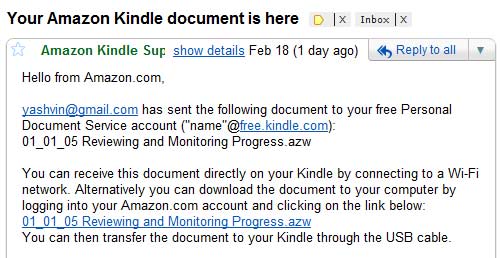
Although the native support of PDF documents on the latest Kindle, you can easily convert them into a more adapted e-book format for the Kindle. No need to download any extra software. When you register your device, the latter gets an email address (example : “yourname”@free.kindle.com). Just mail the documents to be converted to the email address with the subject “Convert” and few minutes after, you will
- Get the converted docs on your Kindle if it is connected to the web
- Get a mail with the links to download the document to your computer.
Experimental features
As I said at the beginning of this post, Amazon included 3 experimental features on the latest generation of the Kindle:
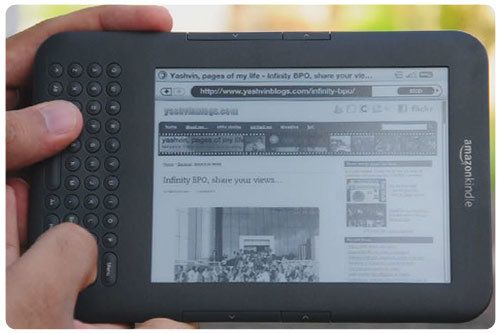
- Web browser
- Listen to MP3 playing in the background while reading your book
- With “Text to Speech”, just relax and listen to the voice reading out your text or helping you to navigate through the menus
Price tag
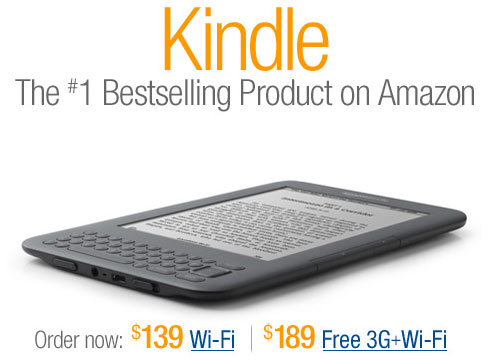
For an additional of $20, DHL delivers the device at your doorstep, in Mauritius. It took only 4days for the reader to reach Mauritius, and 1 day for processing. You might also need to pay 15% VAT. I said “might” because one of my friends got her’s delivered without any extra charges.
I paid my VAT like a good boy and the total price came around Rs5515. Don’t forget to keep an additional budget of $20-$50 to get hold of a case or sleeve to protect your new toy.
What about a video?
In case you wonder if it plays video, the answer is No.
But if you ask to view a small video of the Kindle 3 in my hands, I will happily invite you to watch my demo below or directly from youtube. Covered in this vid : Look and feel of the device + Text-To-Speech feature + Web browsing
My sincere apologies for the annoying sounds of the motorcycles passing by 😛
Some amusing incidents
Before ending this long review, I wish to share a few incidents lol.
1. First use
When DHL dropped the parcel at my office, I immediately ran to my desk to open it (or rather tear the box). It looked like the shot below :
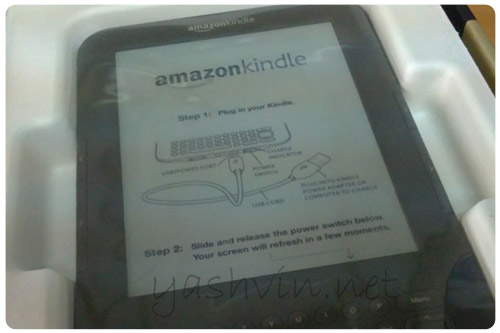
I grabbed it in my hands, and made head and tail to remove the “Amazon Kindle” white paper which you can see above. I looked at every corner, tried to scratch the thing to remove it off the display area so that I could have a look at the real screen.
After a few seconds, I gave up. I told myself that it was better to read the user guide first before I break things. I took the USB cable, plugged it into my laptop and to my surprise, the display changed! YES! It changed! *blush*
The thing you see above is actually the screen, there was no protective cardboard or paper as I blindly believed! I was ashamed of myself lol. But instead of keeping this to myself, I shared it with my colleagues and to you, my dear readers because I believe that I am not the first one trying to scratch the screen (isn’t it Jaya?), despite the Step 1 and Step2 clearly written above! LOL.
2. No, it is not a touch screen!
Guess what was the first action of apprx 99% of the people who got hold of my Kindle?
They swept their fingers across the screen, thinking that it is a touch screen device! One after the other, most of them did exactly the same thing. I finally used this as a kind of test and at each time, I laughed when anyone tried to change pages by touching the screen!
[yashvinblogsfan]
The review ends here…
I really enjoyed the last 3 hours writing this blog article and I sincerely hope that you have a better idea of what is a kindle and how good it is at fulfilling its main purpose, reading ebooks.

If you like this article, I will be most thankful if you LIKE this page and SHARE it on your Facebook profile. And why don’t you join my Facebook Fan page if you haven’t yet? That’s how you gonna make this blog more popular and also, share what you know with your friends.
Any questions or comments, feel free to use the comments section below!
Looking forward to do another review for you soon, till then, keep reading my blog 😉


Being an iPhone & iPad user, my first reaction was to swipe my finger on the screen. Lol
However it cant be used for reading in the dark.
LikeLike
@Splash : Yes, just like a book, which can’t be read in the dark too 😛
One thing I can assure, not all of my “testers” previously used an iphone/ipad or any touch screen device. It became some kind of mechanical action, perhaps because of the large display.
LikeLike
I’ve the Kindle app installed on my Android phones!
LikeLike
haha mo penkor invest dans ene cover mo meme! Been throwing it in my bag everyday and not scratched…yet 🙂
It’s also super useful when you go on holiday/travel – instead of lugging around a guide book and loads of maps – kindle to the rescue!
LikeLike
Awesum…kindle is gaining my interest huh..esp wen i spend more zan Rs2000 almost every month 2 get new buks..do Ebay accounts work wiz Amazon??? Hmmm…i guess i shud as wel check out z amazon post..
anyways..this is 1 real gud post..very informative..important fings said in simple words…hv fun wiz ur kindle..n i am jealous 😮
LikeLike
Really nice Review. Hoping to grab one soon too.
LikeLike
nice review.
but question ? why have you not bought the Galaxy Tab or iPad ?
is it for same reason like for mobile phone and dSlr. ?
The mobile phone can be of latest generation with high MB pixels\tech but we still love our dSlr because of quality pic. ?
LikeLike
Thanks for this practical review which has made me curious as to what kind of selection is available for e-books? I suppose I will try to check on this online.
LikeLike
Great review. I guess that if all you want is reading books (without hauling them around), the Kindle is the perfect device. 😉
That said, there are only two things that would put me off – lack of ebooks (points at Harry Potter) & colour screen (bet the next version will have one – great for comics!).
*Goes back to reading his Tintin comic books.* 😛
LikeLike
🙂 Swapping fingers :p
Moi mo konten mo kindle :p
LikeLike
Hello @Shah! Yeah, saw that kindle apps were available for different devices. But the apps do not make those devices into a kindle 😉
@yurit0s: As I said, I only wanted an ebook reader. Surfing on the web, or playing games is unnecessary for my purpose. I think that your example suits the purpose too 🙂
LikeLike
hey yashvin. just dropping by to say i’m getting mine too this week. why? mainly because of eye strain from reading ebooks and articles on my phone and laptop. 2nd: battery life! plus a lot of my textbooks are now on pdf. 3 Gb will be useful for that too.
now, i must get a nice cover to ward off the geek stamp on my face 🙂
good review
LikeLike
hey, what about the 3G and wifi? the 3G works in mauritius with good browsing experience? thx for answering. 🙂
LikeLike
How much is it
LikeLike
Hi @spddd!
I can’t say anything abt the 3G because I got only the wifi version one. Hope that someone can give you an answer.
@Armand: I think that you haven’t read my post carefully 😛 I said it above, the total cost was about Rs5515.
LikeLike
hhhmmmm nice device… but only 2 things turn me off
first is zat it lacks touch screen n
second is zat it doesnot hav a colour screen which doesnot improve web experience
so sad zat dis latest device doesnot hav latest technology like galaxy tab or ipad. frm my point of view 2.5/5
LikeLike
n ya monochrome screen is a very outdated technology n on a device like dis it reduces the beauty of it. if it wud hav been a colour screen it wud have been more fun
LikeLike
@m18, thanks a lot for your point of view. You dont seem to understand that the kindle and ipad/galaxy do not share the same technology and uses. And of course, price.
LikeLike
Woahh nice review! Nobody can’t deny that the Ipad/galaxy tab don’t last long under heavy usage. The real beauty of the Amazon Kindle is without doubt its long battery sustainability and probably it’s because of the monochrome screen. Amazon is bold enough to use such technology but I can see their logic behind their madness through your review.
By the way, has it got an embedded flash player in its browser? Say I want to stream YouTube? There is one last thing I want to say….you could not be more right about grabbing one of these after reading your article. My bro is your latest victim! 😉
LikeLike
@yash
it was only my point of view n everybody got its point of view about sumthing n i really respect urs n i was expressing myself n if u lyk it so just keep it up 🙂 n ya i was a bit confused about the kindle n the ipad loll i didn’t know that the kindle was an e-book reader or i dunno wat. HAVE FUN WITH UR KINDLE :’)
LikeLike
I have had a look at the list of books, newspapers and magazines available online and I am impressed by the choice. The Kindle is a useful tool in that it can also save money on expensive subscriptions, postage and delays with the post. You can instantly download books for reading. Just for these reasons I am tempted to get one myself.
LikeLike
😛
of course im the 13000th commenter 😛
LikeLike
@Muzz : CONGRATZ!
LikeLike
Neat neat neat! i’ll love to get one of those! Added to my wishlist! Nice review as always yashvin. 😀
LikeLike
Where will your thing go after its lifetime? Not there, I hope…
LikeLike
is it possible to drag and drop documents to kindle from PC using USB connection? Or email is the only way?
Nice Review, BTW!
Thanks.
LikeLike
@aditya, thanks for your comment.
Yes, you can drag n drop your documents onto the kindle drive once it is connected through USB.
As you can guess, documents won’t be converted to the Kindle format in this way if you copy the original documents right away.
In case you are worrying that you don’t have a wifi connection, you can relax. When sending the docs to the email add for free conversion, Amazon emails you a link to download the converted doc on your PC. You can then download the document on the PC and copy it through USB.
Hope that I replied to your query.
Keep coming 😉
Y.A
LikeLike
yes it does…i’m definitely buying one.
Thanks a lot.
LikeLike
Hey yash – dhl claimed the extra charges 780rps after few weeks. Salesman error 🙂
LikeLike
Hi Yash.
nice review.good job for your blog! it has lots of interesting information.
I have my project which includes charts and some diagrams and it’s in pdf. i wanna know if the kindle 3 will be able to read it? can it be converted into the kindle format for free, with all the diagrams?
would you recommend the kindle wifi at $139 or the new kindle DX?
thx
LikeLike
Hello @DS.
There’s only 2 ways you can check out how your document will look like in the kindle :
1. Try it on a kindle directly
2. Install a free Kindle application on your computer. You can download the Amazon’s software here : http://www.amazon.com/gp/feature.html/ref=kcp_pc_mkt_lnd?docId=1000426311 or even on your mobile phone.
Give it a try and I am sure that this will answer your first question.
As for which Kindle you should purchase, I believe that the normal one at $139 will be ok for most users and it is more affordable too. Up to you to see if you want a portable and small reader, or a larger one (and more expensive).
Do come on the blog again 🙂
Y.A
LikeLike
Hey in the end, I did not have to pay VAT on the order! Now I can only speculate on either of the two possibilities:
1. DHL receiving a threat for wrongly computing my VAT amount. I emailed them, with an excel sheet detailing the correct VAT, after adjusting for the exempt amount(Less plausible)
2. Kindle3 was ordered as a gift, with wrap(cost me $4) and personalized messaged(Happy Birthday).
It could be the customs allowed the parcel to be released without any additional fee.
For sure, I bought this for dad, but feeling tempted to keep it for myself now! I still find reading on my apple device easier(finger swipe, word selection for dictionary). However, the kindle 3 adds a new dimension to my studies, with finance books available here(but not on epub version).
Even tried the email conversion for word based pdf files. Worked wonders for me!
LikeLike
I’m starting my Computer Science course on monday at UoM.
I was wondering whether a kindle would be a good investment for my studies? I guess i would no longer need to carry books.
The only very disappointing thing in kindle as from what i’m reading is it doesn’t has a Memory Card slot.
But, it has lots of features that sufficienctly overpowers its cons.
Should i get one?
LikeLike
hi everybody, where can I get a cover for kindle in Mauritius ps?
LikeLike
So Yash, you got the Kindle 3 Keyboard without the 3G?
I’m looking forward to buy one of these as well. The Kindle 3 Keyboard version imo is better than the Kindle 4 priced @$109. What are your thoughts? 😛
LikeLike
I have not really read much about the Kindle 4 but as per my guess, the Kindle 4 might be even much better than the 3rd version. Personally, I have not used the keyboard much because as I said, the Kindle is mainly an ebook reader. That’s what it does best, and no one can beat it for that.
The Kindle 4 is also cheaper. Go for it!
LikeLike