This tutorial will show you how to use any email address to sign in MSN Messenger…
You can use your Yahoo or Gmail or any other personalised email address…
No need to create a hotmail account just to use msn messenger !
Screenshots are provided for each step!
Step 1
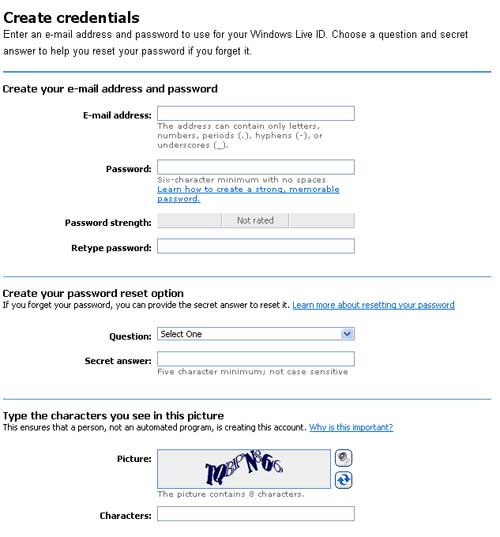
Click here to get start to open the page below…

Fill in the fields, including the email address with which you want to sign into msn messenger.
Step 2
After filling all the fields in the previous screen, you will need to retype your email address in the text field provided as below.

Then click on “I Accept” to proceed to next step.

Step 3
Click on “Continue” and open your email inbox to verify the mail which will be sent to you shortly.

In case you can’t find the mail, check your spam folder…
Even in my inbox, the mails automatically land into the spams!
Step 4
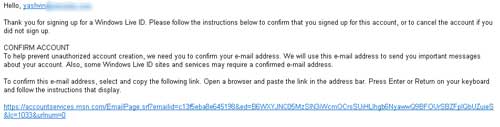
Now that you have got the mail, click on the link provided as shown below.
Step 5
When you have clicked on the previous link, you will get a screen as shown below.
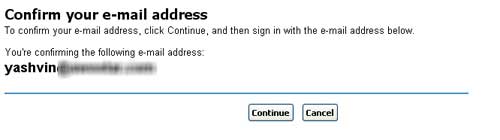 Clicking on the “Continue” button will confirm your account.
This step will prevent you from getting a “Email not verified” message added to your msn display name when you sign in.
Repeat the steps above in case you get such “Email not verified” message
Step 6
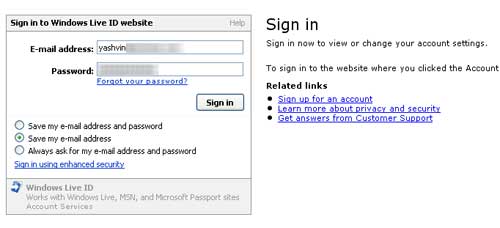
You will be asked to sign into Windows Live ID web site.
Enter your email address and the password which you created above
 Step 7
If you reach the screen below, its time to congratulate yourself!
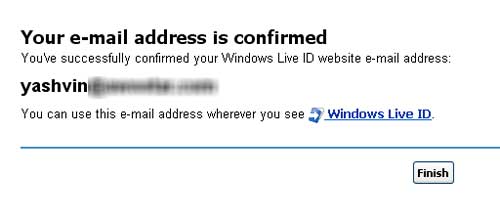 Click Finish to complete…
Step 8
Now, you can sign into msn messenger 🙂

CONGRATULATIONS on your new msn email address !

Click here to join my Facebook Fan Page with over 1200 members!
 Yashvinblogs
Dear Yashvin, i’ve been trying to many time by your method to register to it… but it always says that there are some error or i dont know what… every steps are ok till step 2… but i dont get the same for step 3!!!:S:S:S pls help!
LikeLike