A few days ago, I was nearly ‘terrified’ when I read an article on the web about Mozilla Firefox.
Do you use Firefox? And I bet that YOU want to get that feeling too, isnt it?
Ok, follow the steps shown below :
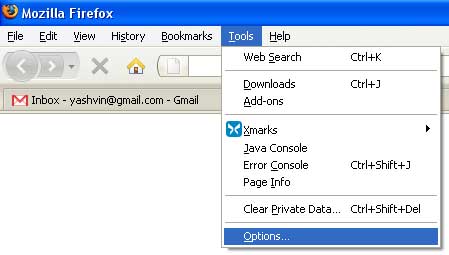
1. Go to Tools > Options

2. Click on “Privacy” and then, “Saved Passwords”.
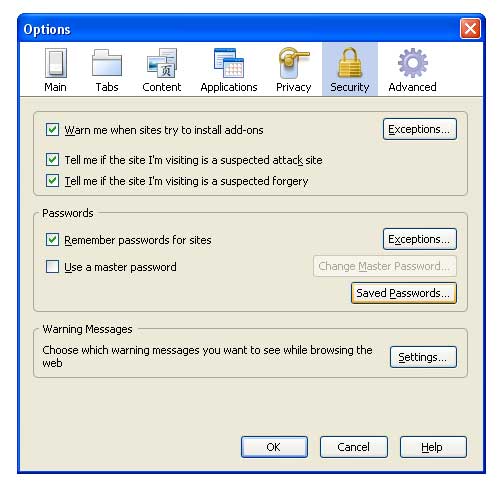
3. As shown below, there’s a whole list of all the sites for which u accepted Firefox’s help, that is, to remember your password.

4. It is still ok, but now click on “Show Passwords” and then Choose “Yes”!

You can now view all the PASSWORDS stored on Firefox!!!
pfff! Sure, it can help you to retrieve some lost passwords, but do keep in mind that during months/years (lol), your passwords were totally unsecured!
Perhaps someone has already copied all your passwords since long!
What can be done?
Be reassured, No need to change browser!
Put a tick on the option “Use a master password” and then, enter another password to protect your other passwords, lol.

Another advice :
If your computer/laptop is used by several persons, CHANGE ALL YOUR PASSWORDS NOW!
Be careful friends, computers and the web may be dangerous 😛
 Yashvinblogs
WHAT!?!?! You didn’t know that??!?! 😐
LikeLike
carrotmadman6 said:
WHAT!?!?! You didn’t know that??!?! 😐
LoL Yashvin..I use firefox for this only reason. Because it gives me all my password..I often forget them..lol
LikeLike
Thats not an issue.. even if you set a master password.. there are ways to get around(some handy FF tools). Its not a security breach.. you save your passwords only on PC which you trust. Then, the master password is………… *drum rolls* *suspence* TADAA! : the windows login 🙂
LikeLike
Really? You didn’t know? :p
That’s a very nice feature as long as you are careful to use it only on your personal accounts.
LikeLike
Nops, no one ever told me abt that, until I read it.
Hope it will be useful to some people 🙂
LikeLike
interesting security issue, I do not use the option to remember password for sites.
LikeLike
Wool but better late than never 😛
LikeLike
I have a small challenge for readers of this post : Who can unblurr the text from the images above? 😀
LikeLike
@Roushdat : haha! Give it a try…
There is a feature in photoshop, unblur text 😛
LikeLike
Thnx! Pfff!!! pas facile sa technologie la!
LikeLike
Hi,
maybe one could try: Eikon Digital Privacy Manager
Great gadget for remembering your passwords (for websites, for apps and for logon)
LikeLike
Touletan Firefox ti kumsa…
kuma to en retard?
The same feature/’bug’ exist on Chrome
however u can only show 1 site saved password at a time when u click on ‘Show Password’
Ur passwords are ‘safe’ if each user have their own profile
LikeLike
The Remember Password feature is given by Firefox not to use on public computers but our own personal browsers and i don’t think some1 will come and check your personal computer at home to get ur password 😛 (and do you always leave your computer unlocked when u are not using it?) We can use private browsing on the public computers. I see this feature really helpful in Firefox but it’s just that you must know how to use it 😀
LikeLike
euta merci for the news. personne pane dir toi sa!
so THANK YOU. MO IN CONNER GRACE A TOI. aster mo cav alle rod mo ban forgotten password!
LikeLike
This is why I never ever allow a browser to keep my passwords. An authentication cookie is good enough.
Eddy.
LikeLike
2 Applications only RoboForm and KeyScrambler for saving your passwords and protecting them as well from other people and keyloggers.
LikeLike
Frak that fox! Google Chrome 4.2+ FTW! (I didn’t read the blog entry LOL)
LikeLike
Setting master password does not make your ffox ‘secure’
you can google and easily delete all the master password and thus losing all the data including passwords and cache.
I don’t know whether this is a bug or anything else. But the fact that master password is stored on local browser makes it rather difficult to think about any other way around
LikeLike